Site Information
Fluke Cable Testing
Upload PDF report + FLW project file
PDF is auto-checked on upload:
- Every cable must show PASS
- Cable Type must be 1091 or 2091 (CommScope SYSTIMAX — warranty req.)
- 1091 is non-Plenum cable, 2091 is Plenum cable. Select the proper cable. You will get a warning if you select 2091.
- Headroom must be > 1 dB
Correct Fluke Cable Type setup (CommScope warranty):
Test Setup → Edit → Cable Type → More → Manufacturers → CommScope (SYSTIMAX) → 1091 (match NVP to your spool). Do NOT use a generic Cat 6/6A entry.
The default Test Limit (TIA Cat 6A) is fine — only the Cable Type must be 1091/2091.
PDF Report (analyzed for pass/fail) See example
Drop Fluke PDF here, or click to browse (from LinkWare)
⚠️ No cable labels detected in this Fluke PDF
Your cable pulls should be labeled (AP, AV, Fire, BMS, Camera, etc.) in LinkWare so we can verify the correct photos were uploaded. Please label your pulls and re-export.
📋 Cable pulls detected in this Fluke PDF:
Use this to know how many AP photos and which cable-pull photos to upload below.
FLW Project File (captured for records)
Drop FLW file here, or click to browse (from LinkWare)
Auto-checked on upload:
- Signal must be -75 dBm or better everywhere in building
- No dead zones or weak spots within walls
Drop NetSpot heatmap here, or click to browse (PDF or image)
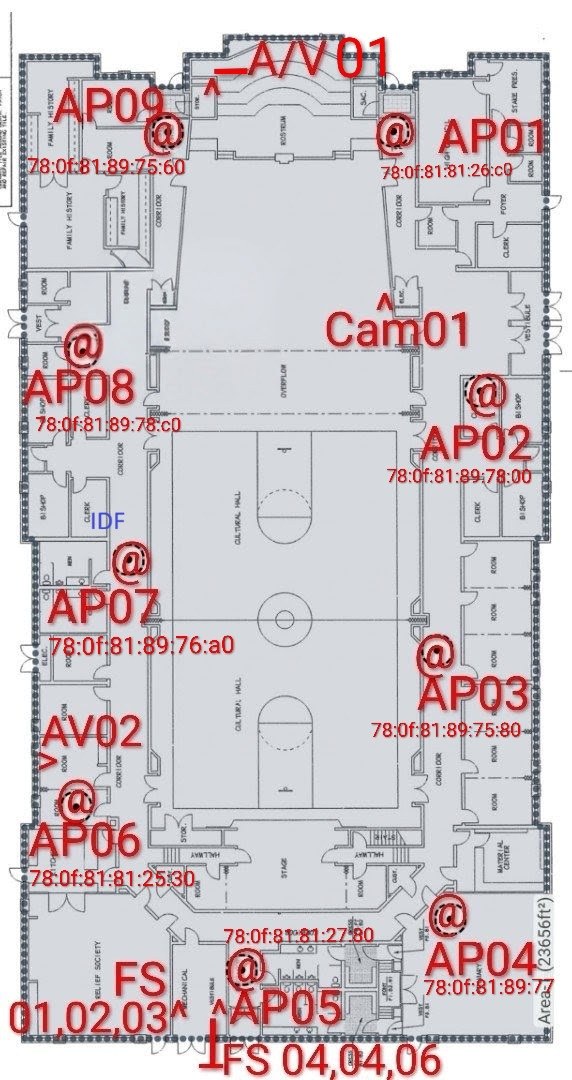
Upload a diagram showing:
- AP locations marked on the floor plan
- Rack location marked on the floor plan
- AP MAC Address (full) — e.g. AP-01 = 00:00:AF:5F:C2:00
You can use your floor plan heat map or snap a photo of a fire escape plan (often found in the custodial closet).
Drop diagram here, or click to browse (PDF or image)
Field Photos
Click Upload or drag a photo onto each item
If you are uploading images from an iPhone 7 or later and it is using HEIC images, you may see a slight delay when you drop your photo in the slot. This is normal/expected behavior.
Questions
Church-Provided Quality Acceptance Checklist
0 of 15 answeredComplete this checklist on-site prior to closeout. This is the Church's official acceptance checklist, unchanged from the source Vendor Guide.
How many WiFi dongles were left at this site? (0–15)
Submit with Photo Warnings
One or more photos were flagged by AI and you chose to proceed. Explain why these photos are acceptable (what required elements they show). This is recorded with the submission. Minimum 30 characters.
0 / 30 characters
AI checking is NOT a complete site sign-off
All uploads MUST be signed off by the CompuCom PMO: [email protected]
They will receive a copy of the ZIP file emailed to them upon submittal.
Deliverables Submitted Successfully
Your project coordinator will review and follow up if needed.